
Enclosures

An enclosure is a melodic concept. At a minimum it involves a target note (scale note) wrapped either side by two notes that draw the listener’s attention to the target. As usual, rhythmic placement can strengthen or reduce the effect. Emuso supports enclosures.
Chromatic notes can be explicitly added to a scale without the scale losing its identity when heard. This adds more ear-candy to the melody.
Previously, adding non-scale notes caused emuso to no longer recognise the underlying scale, which then meant (auto) chord generation wouldn’t work. Now, a melody can be created including chromatic notes (by selecting notes on the virtual guitar as usual) and transposed, and the chromatic notes are handled.
This opens up a massive world of melodic ideas, which sound related and structured to the listener. It’s amazing for dipping into, taking a couple of ideas and developing those on the guitar. It can feel very unfamiliar initially, but it’s worth exploring at least a little.
Here you’ll learn about the concept, and how to drive emuso to work with the concept. This is the first of a series about enclosures.
Prerequisites
Scale familiarity (not getting lost on-instrument) and awareness of each interval in the scale.
The concept
The notes you wrap the target scale note with are
- both diatonic (1 or 2 semitones away)
- both chromatic (1 semitone away)
- chromatic below, diatonic (1 or 2 semitones away) above
- diatonic (1 or 2 semitones away) below, chromatic above
As a minimum, this gives a fragment of 3 notes. The fragment can transposed through the scale (that is, repeatedly changing the target note to the next scale note). Rhythmically, some possibilities are
- In 4/4, these can be played as 1/4 notes, with a 1/4 rest, in each bar.
- In 4/4, triplets, using one triplet per beat.
- In 4/4, playing groupings of 3 quarter notes, starting on beat 1, then beat 4 of the first bar, then beat 3 of the next bar, beat 2 of the next bar, and then beat 1 of the next bar, where it starts again. Each group will stand out due to the same melodic shape appearing in each group, plus the change of notes. Accenting the first note in the group will help make the grouping even clearer to the ears.
- Using 1/8th notes instead, with the above
We’ll look at a few examples below, fitting these into, or starting, an overall ascending or descending melody (lick), and how to transpose them through the scale providing the diatonic notes.
Using the mouse to create or mark a note as chromatic
- CTL+Alt+left click associates a note with the scale note one semitone higher in pitch
- CTL+Shift+Alt+left click associates a note with the scale note one semitone lower in pitch
- If the clicked location is empty (a non-scale note) this creates that chromatic note
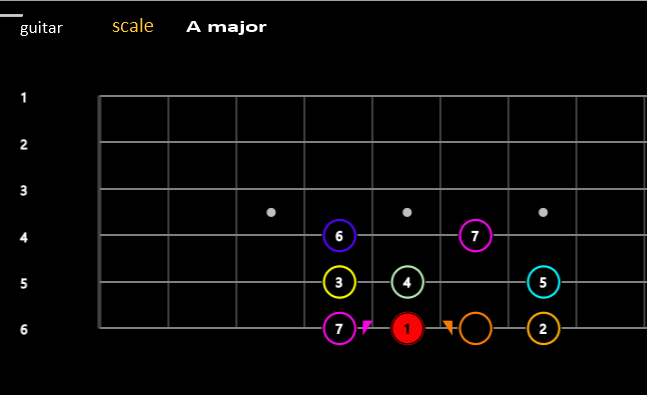
The marked note can itself be a scale note. For example, here is the major scale, and its 7th has been associated with the scale note above it (the 1), and the chromatic note at b2 has been associated with the scale note below it (also 1).
Notice there is a triangle at the right hand side of the 7, pointing at the 1 and at the left hand side of the b2 also pointing at the 1.
Restrictions on marking notes
A chromatically marked note always adheres to its target note. The target must be a scale note.
Wherever the target note ends up (due to transposition), the chromatic note adheres to it. The chromatically marked note will one semitone above or below the target. For now, with emuso, it will be positioned one fret lower (towards the nut) or higher than the target on the same string. A later version of emuso will support moving across strings vertically.
- Any non-scale note can be created, marked as chromatic. For this to be legal, there must be a scale note one semitone below or above it in pitch.
- A scale note can be marked chromatic as well. Its treated as such when translated.
- A chromatically marked note can have its mark reversed by reclicking it with the appropriate CTL+Alt or CTL+Shift+Alt.
A chromatically marked note must not have another chromatically marked note as its target.
How a chromatically marked scale note moves with transposition
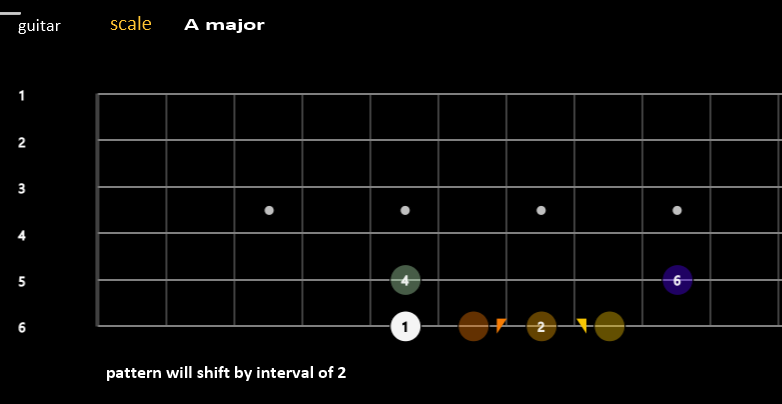
For example, in major scale, the major 7th and the 1 are one semitone apart. The maj 7 is marked as chromatic below the 1.
On transposition by a second, 1 moves to 2, and the maj7, marked chromatic, adheres to what is now 2, as does the other chromatic note.
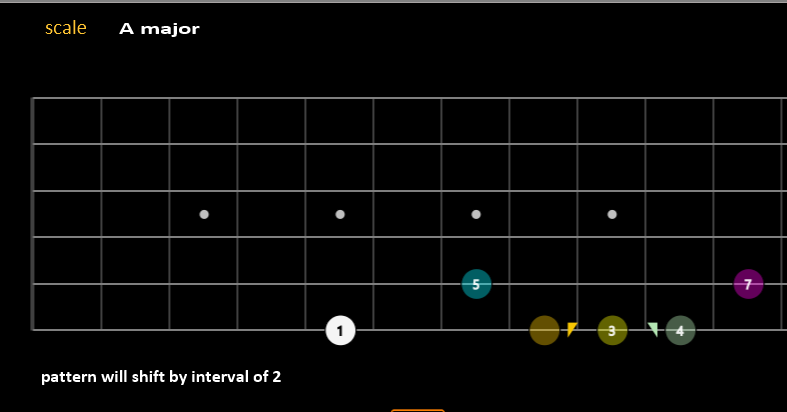
When 2 is transposed to 3 (the maj 3rd), the chromatic notye below it moves to the b3.
Practice
We’ll use the pattern “chromatic below, diatonic above, resolving to target note”
For this, let’s use D Dorian and G mixolydian, and a groove with Dm7 and G.
The following snappet has two muted tracks, asc-enc-triplets, and asc-enc-grouping. To unmute a track, use the “Track” mute button, and click twice on the track.
Both tracks use the “diatonic above, chromatic below, target” for ascending, and “chromatic below, diatonic abive, target” for descending.


